

If you have a website but aren’t getting much traffic from Google, SEO is one of the most important skills to learn.
The problem is that SEO can seem unnecessarily complicated. You will encounter terms such as keywords, crawling, indexing, search intent, backlinks, Core Web Vitals, structured data, canonical URLs, and dozens of other concepts.
You don’t need to master all of them at once.
SEO, or search engine optimization, is the process of improving your website and its content so search engines can understand it and people can discover and use it through search.
This SEO guide for beginners breaks the process into practical steps. You’ll learn how Google Search works, how to choose keywords, how to create useful content, how to optimize pages, what technical SEO actually means, how links help, and how to measure your progress.
The goal isn’t to give you a list of tricks. It is to give you a framework you can use repeatedly.
Quick answer: Effective SEO starts with understanding what people are searching for, creating genuinely useful content that satisfies their needs, making your site accessible to search engines, and continuously improving based on evidence from search performance.
What Is SEO?
SEO stands for Search Engine Optimization.
It is the practice of improving a website’s content, structure, accessibility, and overall experience so that search engines can discover, understand, and potentially show its pages for relevant searches.
For example, imagine you run a small website selling running shoes.
Someone searches Google for:
“best running shoes for beginners”
Your goal isn’t simply to put the phrase “best running shoes for beginners” into a page as many times as possible.
Instead, you might create a useful guide that:
- Explains what beginners should look for in running shoes
- Compares relevant shoe characteristics
- Explains differences between road and trail shoes
- Answers common beginner questions
- Uses clear headings and helpful examples
- Links to relevant products or supporting resources
- Loads properly on mobile devices
- Makes the main information easy to find
That is much closer to modern SEO.
Google’s own guidance emphasizes creating helpful, reliable, people-first content rather than content produced primarily to manipulate rankings.
How Does Google Search Work?
Before learning how to optimize a website, it helps to understand what search engines actually do.
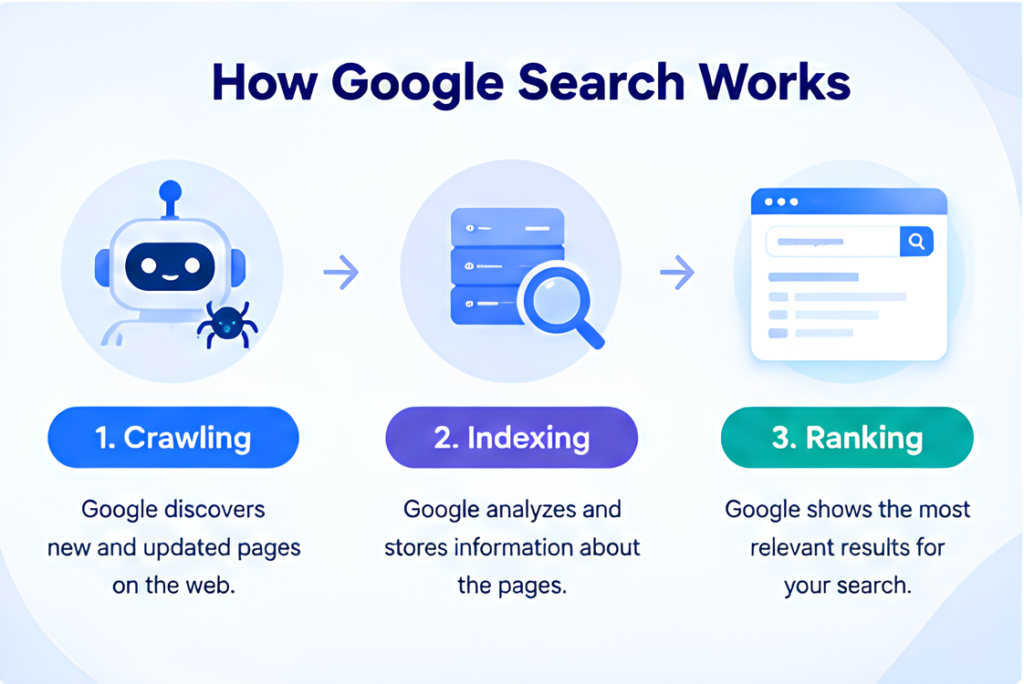
At a simplified level, Google Search involves three major processes:
1. Crawling
Google uses automated systems, commonly called crawlers, to discover publicly accessible pages and resources.
Google can discover pages through links, sitemaps, and other mechanisms.
If Google cannot access an important page, it may not be able to understand or index it properly.
2. Indexing
After discovering a page, Google analyzes and processes its content and information.
If the page is eligible for indexing, Google may store information about it in its search index.
Being indexed does not guarantee that the page will rank well.
3. Serving Search Results
When someone performs a search, Google’s systems attempt to return relevant results.
The exact systems used to determine rankings are complex and continually evolve. Therefore, SEO should focus less on trying to reverse-engineer one ranking factor and more on building a website that clearly satisfies users’ needs.
Google’s Search Essentials provide the fundamental technical, spam-policy, and key best-practice guidance for making content eligible to appear in Google Search.
Why SEO Matters for a Website
SEO can help a website become discoverable when people are actively searching for information, products, services, or solutions related to what it offers.
For a small business, SEO might help attract people searching for a local service.
For an e-commerce site, it can help product and category pages reach relevant searches.
For a blog, SEO can bring readers looking for answers to specific questions.
For a marketing website such as The Marketing Axis, SEO can help connect educational content with people searching for marketing, SEO, AI, business, and online-business information.
However, SEO should not be treated as a guaranteed traffic machine.
Ranking depends on many factors, including the query, competition, content quality, relevance, website accessibility, and Google’s evolving systems.
The Four Core Areas of SEO
Most beginner SEO work can be organized into four connected areas:
| SEO area | Main purpose | Examples |
|---|---|---|
| Keyword & search intent | Understand what people need | Keywords, questions, search intent |
| On-page SEO | Make individual pages useful and understandable | Titles, headings, content, internal links |
| Technical SEO | Help search engines access and process your website | Crawling, indexing, HTTPS, performance |
| Off-page SEO | Build reputation and discoverability | Links, mentions, digital PR |
These areas overlap.
For example, excellent content isn’t very useful if search engines cannot access the page. Similarly, a technically perfect website won’t automatically rank if its content doesn’t satisfy the searcher’s needs.
Step 1: Understand Search Intent
One of the most important SEO concepts for beginners is search intent.
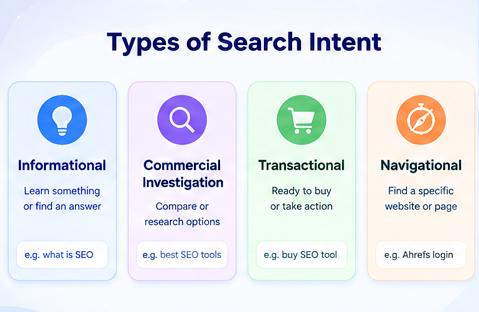
Search intent means the underlying reason someone performs a search.
Consider these searches:
- “what is SEO” — informational
- “SEO course” — investigation/commercial
- “best SEO tools” — commercial investigation
- “Ahrefs login” — navigational
- “buy SEO software” — transactional
The words may look similar, but the user expects a different type of result.
Why search intent matters
Suppose someone searches:
“how to do keyword research”
They probably want a tutorial.
If you create a page that simply lists 50 keyword research tools without explaining how to perform keyword research, the page may not satisfy the user’s actual need.
Before creating content, ask:
What does someone expect to accomplish after searching this query?
Then build the page around that need.
A simple search-intent process
Before writing an article:
- Search the target keyword.
- Examine the pages currently ranking.
- Look at the type of content Google is showing.
- Identify common questions and subtopics.
- Determine what the searcher appears to want.
- Create something that answers that need clearly and more usefully.
Search results aren’t a perfect blueprint, but they provide valuable evidence about the dominant intent.
Step 2: Perform Keyword Research
Keyword research is the process of discovering the words and phrases people use when searching for information.
A keyword doesn’t have to be a single word.
Examples include:
- SEO
- SEO basics
- SEO for beginners
- how to improve website SEO
- how to do keyword research
- technical SEO checklist for beginners
The best keyword isn’t necessarily the one with the highest search volume.
A better question is:
Is this keyword relevant to my audience, and can I realistically create a page that satisfies the search?
Start with a topic
Instead of immediately searching for thousands of keywords, start with a broad topic.
For example:
Topic: SEO
Then expand it into subtopics:
- SEO basics
- keyword research
- on-page SEO
- technical SEO
- link building
- SEO content writing
- local SEO
- SEO tools
You can then identify specific questions and long-tail searches within those areas.
Look for long-tail keywords
Long-tail keywords are generally more specific search phrases.
For example:
Broad: SEO
Specific: SEO for small business websites
More specific: how to do SEO for a small business website
Specific queries can make it easier to understand what the searcher wants and create focused content around that need.
Don’t force keywords into your content
A common beginner mistake is thinking that repeating a keyword improves rankings.
It doesn’t make sense to write:
SEO is important for SEO because SEO helps with SEO and good SEO improves SEO.
Instead, use natural language.
Google’s guidance focuses on useful, people-first content rather than writing primarily to manipulate search rankings.
For a deeper process, your supporting article Keyword Research for Beginners can become the dedicated resource in this content cluster.
Step 3: Create Content That Satisfies the Searcher
Once you understand the keyword and intent, create the best useful answer you reasonably can.
This does not mean writing the longest article.
A 1,500-word article that completely answers a focused question can be more useful than a 5,000-word article filled with repetition.
A useful content process
Before writing, define:
Target reader: Who is this for?
Search query: What did they search?
Problem: What are they trying to solve?
Desired outcome: What should they know or be able to do after reading?
Supporting questions: What else will they probably ask?
Then create the content.
Add original value
You can improve a basic article by adding:
- Clear examples
- Screenshots where useful
- Original explanations
- Comparisons
- Practical checklists
- Templates
- Calculations or tools
- Expert commentary that you can substantiate
- First-hand experience when you genuinely have it
- Updated information
- Clear limitations
The goal is not simply to rewrite what already exists.
Ask:
What useful information would make someone choose this page instead of returning to Google?
Step 4: Optimize Your Page With On-Page SEO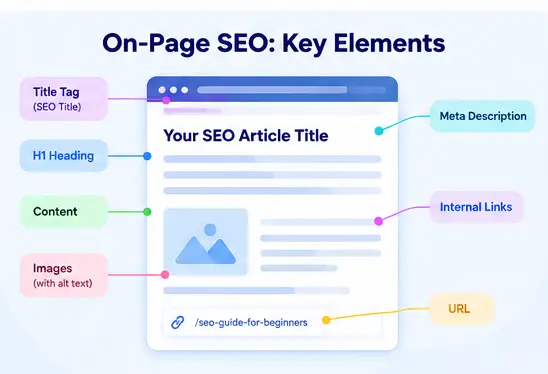
On-page SEO refers to improvements made directly to a webpage and its content.
Important elements include the following.
SEO Title
The SEO title helps describe the page to searchers and can appear in Google’s search results.
A useful title should accurately communicate what the page offers.
For example:
SEO Guide for Beginners: How to Get Started in 2026
is clearer than:
Everything You Need to Know About SEO!!!
Avoid clickbait titles that promise something the page doesn’t deliver.
H1 Heading
The H1 is the primary visible heading of the page.
For this article:
Complete SEO Guide for Beginners (2026)
The H1 should clearly communicate the topic.
Headings
Use H2 and H3 headings to organize the article logically.
For example:
- H2: What Is SEO?
- H2: How Does Google Search Work?
- H2: How to Do SEO
- H3: Understand Search Intent
- H3: Perform Keyword Research
Headings should help readers navigate the page rather than exist simply to insert keywords.
URL
Keep URLs descriptive and reasonably short.
For this article:
/seo-guide-for-beginners/
is preferable to a long URL containing unnecessary words and parameters.
Meta Description
A meta description can summarize the page for searchers.
Google may use the description you provide, but it can also generate a different search-result snippet depending on the query.
Write naturally and accurately rather than treating the meta description as a keyword list.
Step 5: Improve Internal Linking
Internal links connect one page on your website to another page on the same website.
They help readers discover related information and help search engines understand relationships between pages.
For example, this article can naturally link to:
- Keyword Research for Beginners
- What Is Search Intent?
- On-Page SEO: A Beginner’s Guide
- Technical SEO: A Beginner’s Guide
- SEO Content Writing: How to Create Content That Ranks
Instead of using generic anchor text such as:
Click here
use descriptive anchor text such as:
learn how search intent works
when it accurately describes the destination.
Think in content clusters
A strong SEO site shouldn’t consist of hundreds of unrelated articles.
Instead, organize related content into topic clusters.
For example:
Pillar page:
Complete SEO Guide for Beginners
Supporting pages:
- Keyword Research for Beginners
- What Is Search Intent?
- On-Page SEO
- Technical SEO
- SEO Content Writing
The pillar page can link to the supporting resources, while the supporting pages can link back to the pillar when relevant.
This creates a clearer information structure for both users and search engines.
Step 6: Learn the Basics of Technical SEO
Technical SEO sounds complicated, but beginners don’t need to become developers to understand the fundamentals.
Technical SEO focuses on making a website accessible, understandable, crawlable, and usable.
Crawling and indexing
Make sure important pages can be discovered and aren’t unintentionally blocked from search engines.
Review:
- Robots.txt
- XML sitemap
- Internal links
- Noindex directives
- Canonical URLs
- HTTP status codes
You don’t need to change these settings constantly.
The goal is to prevent avoidable technical problems.
HTTPS
Your website should use HTTPS.
HTTPS encrypts the connection between a user’s browser and the website and is an important part of a secure website experience.
Mobile usability
Your website should work properly on phones and tablets.
Check:
- Text size
- Navigation
- Buttons
- Images
- Tables
- Forms
- Pop-ups
- Page layout
A page that works beautifully on desktop but is frustrating on mobile is not providing a good user experience.
Website speed and Core Web Vitals
Google’s Core Web Vitals measure aspects of real-world page experience.
The current Core Web Vitals include:
- Largest Contentful Paint (LCP): loading performance
- Interaction to Next Paint (INP): responsiveness
- Cumulative Layout Shift (CLS): visual stability
Google recommends aiming for an LCP of 2.5 seconds or less, INP below 200 milliseconds, and CLS below 0.1 for a good user experience.
Don’t obsess over achieving a perfect score just because a tool displays one.
A fast, stable, usable page is the real objective.
Google also states that page experience is broader than Core Web Vitals alone and that good scores do not guarantee top rankings.
Useful technical SEO tools
For a beginner, start with:
- Google Search Console
- PageSpeed Insights
- Google Analytics
- Your website’s CMS tools
- A reputable SEO crawler when your site becomes larger
You don’t need ten SEO platforms to start learning SEO.
Step 7: Use Google Search Console
Google Search Console is one of the most useful free tools for website owners.
It can help you understand how your website performs in Google Search and diagnose certain technical and indexing issues.
After verifying your website, regularly check:
Performance
Look at:
- Clicks
- Impressions
- Queries
- Pages
- Average position
- Click-through rate
Don’t interpret one metric in isolation.
For example, impressions increasing while clicks remain flat could indicate that your pages are appearing for more searches but aren’t compelling enough to earn clicks.
Indexing
Check whether important pages are indexed and investigate unexpected indexing issues.
Core Web Vitals
Search Console provides Core Web Vitals reporting based on real-world user experience data.
Search appearance
Review how your pages appear in Search and identify opportunities for improvement.
Step 8: Build a Strong Content Structure
Publishing random articles isn’t a reliable content strategy.
Instead, decide what your website wants to become known for.
For a marketing website, possible topical areas include:
- SEO
- Digital marketing
- Content marketing
- AI for marketers
- Marketing tools
- Social media
- Online business
Then build depth within each topic.
Example SEO cluster
A simple SEO cluster could look like:
SEO Guide for Beginners
↓
Keyword Research for Beginners
↓
What Is Search Intent?
↓
On-Page SEO: A Beginner’s Guide
↓
Technical SEO: A Beginner’s Guide
↓
SEO Content Writing: How to Create Content That Ranks
You can expand the cluster later with focused articles about internal linking, local SEO, link building, image SEO, structured data, SEO audits, and Search Console.
Step 9: Understand Backlinks and Off-Page SEO
A backlink is a link from another website to your website.
Links can help search engines discover pages and can act as signals of reputation and relevance.
But beginners often make link building unnecessarily complicated.
Don’t start by buying hundreds of backlinks.
Instead, create things worth referencing.
For example:
- Original research
- Useful statistics with clear sources
- Free tools
- Templates
- Detailed guides
- Original data
- Helpful resources
- Industry commentary
- Unique comparisons
Then promote them through appropriate channels.
What about guest posting?
Guest contributions can be legitimate when they are created to reach a relevant audience and provide genuine value.
The problem is using guest posts primarily to manipulate links.
The same principle applies to many SEO tactics: the purpose and quality matter more than simply performing the tactic.
Google’s spam policies specifically address practices intended to manipulate search rankings, including scaled content abuse and other deceptive techniques.
Step 10: Use AI Carefully in SEO
AI tools can be useful during content production.
For example, AI can help with:
- Brainstorming topics
- Creating outlines
- Finding questions to investigate
- Improving clarity
- Summarizing your own notes
- Generating draft ideas
- Identifying content gaps
But there is a major difference between using AI as an assistant and publishing large amounts of low-value automated content.
Google’s guidance says generative AI can be useful for research and adding structure to original content, while generating many pages primarily to manipulate Search and without adding value can violate its scaled-content-abuse policy.
A sensible workflow is:
Research → outline → draft → verify → add original value → edit → publish → monitor
Don’t assume AI-generated information is automatically accurate.
Verify important claims, statistics, product information, dates, and technical recommendations.
SEO in 2026: What Has Changed?
Search is increasingly incorporating AI-powered experiences.
Google now provides AI features such as AI Overviews and AI Mode, and Google says its existing SEO fundamentals remain relevant to these experiences. It does not require a separate special optimization system for a website to appear in these features.
Google’s 2026 guidance also emphasizes valuable, unique content and continuing to follow established SEO fundamentals when thinking about generative AI search experiences.
That means you shouldn’t chase every new acronym or “secret AI SEO hack.”
The fundamentals still matter:
- Make content useful
- Match search intent
- Make pages accessible
- Build a logical website
- Demonstrate genuine expertise where appropriate
- Keep important information accurate
- Improve user experience
- Earn attention and references naturally
Google also announced new Search Console reporting for visibility from generative AI features; as of August 31, 2026, Google said these insights had rolled out worldwide.
This makes Search Console increasingly useful for understanding not only traditional search visibility but also visibility within Google’s generative experiences.
A Practical SEO Process for a New Website
If you’re starting from zero, don’t try to optimize everything simultaneously.
Use this sequence.
Phase 1: Build the foundation
Set up:
- HTTPS
- A mobile-friendly website
- Google Search Console
- Analytics
- XML sitemap
- Basic navigation
- Clear categories
- About, contact, privacy, and other appropriate trust pages
Phase 2: Choose your topics
Identify the subjects your audience actually cares about.
Create a list of:
- Core topics
- Supporting topics
- Questions
- Problems
- Commercial opportunities
Phase 3: Research keywords and intent
For each important topic:
- Find relevant searches.
- Analyze search intent.
- Review competing results.
- Group similar keywords.
- Choose the primary topic for each page.
Avoid creating five pages that all target essentially the same search intent unless each page has a genuinely different purpose.
Phase 4: Create useful content
Write for the reader first.
Make sure the page answers:
- What is the problem?
- What does the reader need to know?
- What should they do next?
- What mistakes should they avoid?
- What questions are likely to follow?
Phase 5: Optimize the page
Review:
- Title
- H1
- Headings
- URL
- Introduction
- Images
- Internal links
- Meta description
- Structured data where appropriate
- Mobile experience
- Page speed
Phase 6: Publish and promote
Publishing isn’t the end.
Promote useful content through appropriate channels such as:
- Social media
- Communities where sharing is genuinely helpful
- Industry relationships
- Digital PR
- Relevant outreach
Phase 7: Measure and improve
After the page has collected enough data, review its performance.
Look for:
- Queries
- Impressions
- Clicks
- Pages gaining visibility
- Pages losing visibility
- Search intent mismatches
- Content gaps
- Technical problems
Then improve the page based on evidence.
SEO Checklist for Beginners
Use this checklist before publishing an important page.
Search intent
- I understand what the searcher wants.
- My content matches that intent.
- The page provides a clear answer quickly.
Content
- The information is accurate.
- The article adds useful value.
- Examples are relevant.
- There is no unnecessary repetition.
- Important claims are supported where necessary.
On-page SEO
- The title accurately describes the page.
- There is a clear H1.
- Headings are logically organized.
- The URL is descriptive.
- Images have useful alt text when appropriate.
- Internal links point to relevant pages.
Technical SEO
- The page is accessible to search engines.
- The site uses HTTPS.
- The page works on mobile.
- There are no obvious indexing problems.
- The page performs reasonably well.
User experience
- The main content is easy to find.
- Ads don’t overwhelm the content.
- Navigation is straightforward.
- Pop-ups don’t unnecessarily interrupt the reader.
- The page is easy to read.
Google’s current page-experience guidance specifically encourages site owners to consider Core Web Vitals, HTTPS, mobile presentation, intrusive interstitials, and excessive or distracting advertising as part of the overall experience.
Common SEO Mistakes Beginners Make
1. Targeting keywords instead of people
A keyword is not the objective.
Helping the searcher is.
2. Choosing keywords solely by search volume
A huge keyword may attract thousands of searches but still be a poor target if the audience doesn’t match your business or the competition is far beyond your current capabilities.
3. Publishing hundreds of low-quality articles
More pages don’t automatically mean more traffic.
Google’s spam policies warn against scaled content created primarily to manipulate rankings without providing meaningful value.
4. Ignoring search intent
If the searcher wants a tutorial and you provide a product page, the content may fail to satisfy the query.
5. Over-optimizing keywords
Repeating the same keyword unnaturally makes content harder to read.
6. Ignoring internal links
A strong article can become more useful when it points readers toward relevant supporting resources.
7. Obsessing over technical scores
Performance matters, but SEO isn’t a competition to obtain a perfect PageSpeed score.
Google explicitly notes that strong Core Web Vitals do not guarantee top rankings.
8. Buying questionable backlinks
Cheap packages promising hundreds or thousands of backlinks can create more risk than value.
9. Copying competitors
Competitor research is useful for understanding intent and content expectations.
Copying their structure and rewriting their sentences isn’t a strategy.
10. Expecting immediate results
SEO can take time.
Your website needs to be crawled, indexed, evaluated, and discovered by users. Performance also depends on competition and the quality of the opportunity.
Treat SEO as a process of building useful assets rather than looking for instant results.
How to Know If Your SEO Is Working
Don’t judge SEO only by whether one keyword reaches position one.
Track multiple indicators.
Visibility
Are your pages appearing for more relevant searches?
Impressions
Are people seeing your pages in Search more frequently?
Clicks
Are users actually visiting your website?
Organic traffic
Is search contributing more visitors over time?
Engagement and conversions
Are visitors taking useful actions?
For a business, a visitor who becomes a customer can be more valuable than hundreds of irrelevant visits.
Content performance
Identify:
- Pages gaining impressions
- Pages gaining clicks
- Pages with high impressions but low clicks
- Pages ranking around the middle of the results
- Pages losing visibility
- Topics producing valuable visitors
This allows you to make decisions based on evidence instead of assumptions.
Advanced SEO Concepts Beginners Should Eventually Learn
You don’t need these concepts on day one, but they become useful as your website grows.
Canonical URLs
Canonicalization helps search engines understand which URL should be treated as the preferred version when similar or duplicate URLs exist.
Structured data
Structured data is machine-readable information added to pages to help search engines understand certain content.
It can support eligibility for certain search features, but adding structured data does not guarantee a rich result.
JavaScript SEO
JavaScript can affect how content and links are discovered and processed.
Google can process JavaScript, but websites relying heavily on JavaScript may require more technical SEO knowledge. Google’s current AI-search optimization guidance also recommends following established JavaScript SEO and crawling practices.
International SEO
If you operate across countries or languages, you may eventually need to understand:
- Language targeting
- Country targeting
- Hreflang
- Localized content
- International URL structures
Log-file analysis
Larger websites may use server logs to understand how search-engine crawlers interact with their sites.
This is generally unnecessary for a small beginner website.
How to Improve SEO After Publishing
Your first version doesn’t have to be your final version.
After publishing, monitor performance and look for opportunities.
For example, suppose an article starts receiving impressions for a question you didn’t explicitly answer.
You could:
- Investigate the query.
- Determine whether it is relevant.
- Add a useful section if appropriate.
- Improve the explanation.
- Add an internal link to a supporting article.
- Monitor the result.
This creates a continuous improvement cycle:
Publish → Measure → Learn → Improve → Re-measure
That is often more productive than constantly publishing new pages without reviewing existing content.
A Simple 30-Day SEO Plan for Beginners
If you’re overwhelmed by SEO, start with one month of focused work.
Week 1: Foundation
- Set up Google Search Console.
- Check HTTPS.
- Test your website on mobile.
- Review navigation.
- Check your sitemap.
- Identify obvious indexing problems.
Week 2: Research
- Choose 3–5 core topics.
- Research relevant keywords.
- Analyze search intent.
- Group related queries.
- Create a content calendar.
Week 3: Content
- Publish or improve your most important pages.
- Optimize titles and headings.
- Add useful examples.
- Improve internal linking.
- Remove unnecessary content.
Week 4: Measurement
- Review Search Console.
- Look at impressions and clicks.
- Identify pages gaining visibility.
- Find content gaps.
- Fix obvious technical issues.
- Plan the next content improvements.
Don’t try to complete every advanced SEO technique in 30 days.
Build the fundamentals first.
The Most Important SEO Principle
SEO has changed considerably over the years, but one principle remains useful:
Create pages that deserve to be found.
That doesn’t mean you should ignore technical SEO, keywords, links, structured data, or search-result optimization.
It means those activities should support a useful website rather than replace one.
Google’s current guidance continues to emphasize people-first content, good page experience, and compliance with Search Essentials and spam policies.
For a beginner, the simplest framework is:
Understand the search → create the right answer → make it accessible → connect it to your website → measure the result → improve it.
Do that consistently, and you’ll have a much stronger SEO foundation than someone chasing every new ranking trick.
Frequently Asked Questions
What is SEO in simple terms?
SEO is the process of improving a website so search engines can understand its content and users can discover it through relevant searches. It includes content, keywords, website structure, technical accessibility, links, and user experience.
How long does SEO take to work?
There is no universal timeline. Results can depend on your website’s age, authority, competition, content quality, technical condition, search demand, and the specific query. SEO should be treated as a long-term process rather than a guaranteed short-term traffic strategy.
Can I do SEO myself as a beginner?
Yes. Beginners can handle many fundamental SEO tasks, including keyword research, search-intent analysis, content optimization, internal linking, Search Console monitoring, and basic technical checks. More advanced technical issues may require developer or specialist support.
Is SEO still important with AI search?
Yes. Google says its fundamental SEO practices remain relevant to AI features such as AI Overviews and AI Mode. Creating useful, accessible, original content remains central to search visibility.
Do I need to use paid SEO tools?
No. You can learn and perform basic SEO using free resources such as Google Search Console, Google Search, and PageSpeed Insights. Paid tools become more useful when you need larger-scale keyword research, competitor analysis, backlink analysis, or technical auditing.
How many keywords should I use on one page?
There is no ideal keyword count. Focus on one main topic or search intent and naturally cover the language and subtopics needed to answer the searcher’s question. Avoid repeating keywords simply to increase their frequency.
Are backlinks still useful for SEO?
Links can help search engines discover pages and can be signals of reputation and relevance. However, pursuing backlinks solely to manipulate rankings can be risky. Focus on creating resources that relevant websites would genuinely find useful enough to reference.
Can AI-generated content rank on Google?
AI assistance does not automatically prevent content from appearing in Google Search. However, Google warns that generating large amounts of content primarily to manipulate rankings and without providing value can violate its scaled-content-abuse policy. The quality, originality, usefulness, and purpose of the content matter.
1 Comment